


July 2, 2026
The Best Google Review Widget for Your Website (2026)
Looking for the best Google review widget? This practical 2026 guide covers what to evaluate, tradeoffs, and who RevuKit is best for.

New Widget
See how AI summaries, live ratings, and cinematic review cards can make your social proof section more persuasive.
RevuKit
Most review widgets do one thing: they copy your Google stars onto your page. That's useful, but it's table stakes. The new AI Summary Carousel goes further — it reads your reviews, understands what your customers are saying, and surfaces that insight as a polished, animated panel that earns trust at a glance.
This is RevuKit's most advanced widget to date. It combines AI-generated review summaries, live Google data, and a set of animations so refined they feel more like a product demo than a review section. If you're deciding between this and a standard embed, compare it with our guide on how to embed Google reviews on your site and test layouts in the live widget preview tool.
The AI Summary Carousel is a single embeddable widget that brings together three layers of information:
The result is a widget that doesn't just prove you have good reviews — it explains why, in plain language, without requiring a visitor to read through every card themselves.
Shows stars and individual review cards. Useful social proof, but most visitors skim and miss the core message.
Shows stars, cards, and a concise AI summary that tells visitors what customers consistently praise, fast. This closes the trust gap without requiring people to read every review.
If your goal is conversion, the AI summary layer usually does the heavy lifting: it gives the buyer the “why people trust this business” answer immediately.
The AI summary is the headline feature. RevuKit processes your Google reviews server-side and generates a concise paragraph capturing the recurring themes — quality, speed, friendliness, value, atmosphere, whatever your customers actually talk about.
This matters because most visitors don't read individual reviews. They scan. A well-written two-sentence summary that says “Customers consistently praise the fast turnaround and knowledgeable staff — several note it's the only place they'll take their car” does more conversion work than a stack of five-star cards with “Great service!”
The summary is pre-cached on RevuKit's CDN, so it loads instantly — no visible delay, no skeleton shimmer waiting for an AI response. It's there when the widget appears.
How summaries update: As new Google reviews come in, RevuKit regenerates the summary on your next sync cycle (every 24 hours on Pro). The cached summary is replaced automatically — you never touch it manually.
The AI Summary Carousel has more animation detail than any other RevuKit widget. Each effect was designed for a specific purpose — here's what's happening and why.
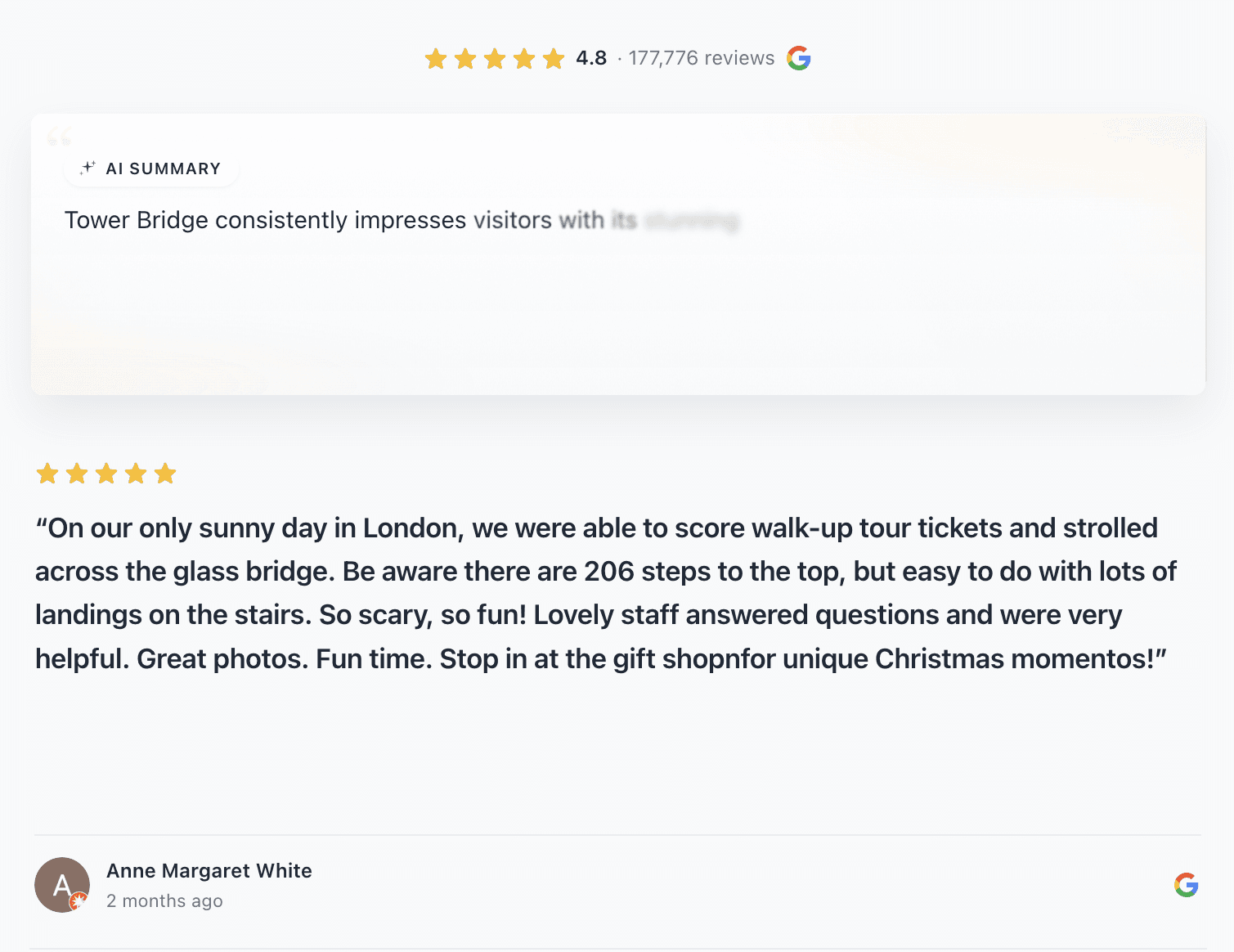
The widget mid-animation — you can see the word-by-word reveal in progress, with early words fully visible and later words still fading in from a soft blur.
When the AI summary comes into view, it doesn't appear all at once. Each word fades in and sharpens individually — starting slightly blurred and transparent, landing at full opacity and focus — with a staggered delay of about 42ms per word.
The effect mimics the way a typewriter builds anticipation, but feels more modern and cinematic: the text seems to materialise out of the air. By the time the last word lands, visitors have read the first sentence — which is exactly where you want their attention.
This is triggered by an Intersection Observer — the animation only runs when the widget actually enters the viewport, so visitors always see the full reveal on scroll.
Move your cursor over the AI summary panel and it tilts in 3D to follow your pointer. This uses a spring-physics simulation running on requestAnimationFrame — the card has velocity and damping, so it settles smoothly rather than snapping. It feels weighty and physical, not jittery.
Simultaneously, a radial glow gradient follows your cursor inside the card. The glow is a subtle highlight that makes the panel feel lit from within — it fades out instantly when your cursor leaves.
Both effects are applied via CSS custom properties (--rk-tilt-x, --rk-tilt-y, --rk-glow-x, --rk-glow-y) that the animation loop updates on every frame. Because these only touch the GPU compositor, there's no layout thrash — the rest of your page is completely unaffected.
Behind the summary text, two softly blurred colour blobs drift slowly using alternating scale and translate transforms — an aurora effect that gives the panel visual depth without overpowering the content. The first blob cycles on an 8-second loop; the second on a 10-second loop with a 3-second offset, so they never move in lockstep.
The panel border uses a conic gradient that rotates continuously on a 6-second loop, giving the impression of a shimmering edge — a subtle but distinctive detail that makes the AI summary panel feel different from a standard card.
Accessibility note: Every animation in the widget — word reveal, tilt, glow, aurora, spinning border — is gated behind the
prefers-reduced-motionmedia query. Visitors who have requested reduced motion see a clean, static widget with zero animation. No compromises.
The AI Summary Carousel is available in your RevuKit account under the Interactive Widgets section. Adding it follows the same pattern as any RevuKit widget:
Using Framer? The AI Summary Carousel is available as a native widget through the RevuKit Framer plugin. Install the plugin, pick the widget, adjust the controls, and click Add to canvas. No code, no embed snippets — it drops straight onto your Framer canvas as a Code Component.
Need platform-specific instructions? See our step-by-step guides for Webflow, Shopify, Wix, and Squarespace.
The AI Summary Carousel is best suited for:
If you have 50+ Google reviews, the AI summary does the synthesis work that no human visitor will do themselves. Instead of picking through dozens of cards, they get the key themes immediately.
The tilt, aurora, and word-reveal animations are deliberately cinematic. If your site has high production values — Framer, custom Webflow, bespoke builds — the AI Summary Carousel matches that energy. A basic badge would feel out of place; this won't.
The combination of animated AI summary + star rating + carousel makes this widget work as a standalone social proof section, not just a supporting element. Place it directly after your headline or alongside your primary CTA.
Healthcare, legal, financial, hospitality — industries where trust is the primary purchase driver. The AI summary gives potential customers the specific reassurance they need before they'll even consider getting in touch.
The widget itself is available for preview on free accounts, but the AI-generated summary and automatic review sync require a Pro plan ($9/month). The AI processing is server-side and tied to your business account.
The summary is generated from your actual Google reviews — it's grounded in real customer language, not invented. It synthesises themes rather than fabricating specifics. If a theme appears in many reviews, it will appear in the summary.
Not directly — the summary is auto-generated from your reviews. However, you can influence it indirectly: the better and more detailed your reviews, the richer the summary. Pro accounts can request a manual refresh of their summary at any time.
Yes. Use the secondary and tertiary colour controls to adjust card backgrounds and text for dark sections. The aurora blobs adapt to your primary colour, so the effect works on both light and dark surfaces.
No. The widget is loaded asynchronously as a lightweight UMD bundle from RevuKit's CDN. All animations run on the GPU compositor — they don't trigger layout reflows. The AI summary is pre-cached, so there's no runtime AI latency.
Most businesses can publish in under 10 minutes: connect your listing, choose AI Summary Carousel, customize styles, and paste one embed snippet.
It works on Webflow, Framer, Shopify, Squarespace, Wix, WordPress, and custom websites that allow HTML/JavaScript embeds.
The AI Summary Carousel is available now for RevuKit Pro and Enterprise users. Start with guided onboarding, then launch your widget from the Interactive Widgets section.
Related Articles
July 2, 2026
Looking for the best Google review widget? This practical 2026 guide covers what to evaluate, tradeoffs, and who RevuKit is best for.
July 2, 2026
Add Google reviews to your website with a free Google review widget, platform setup paths, placement tips, and SEO-safe implementation guidance.
January 15, 2025
Learn why Google review widget updates matter, how 24-hour sync compares with 72-hour cache delays, and how fresher reviews protect trust.